# BankConnect: JavaScript
The JavaScript Client SDK helps users submit their bank statements via upload, net banking credentials or in your Web applications. The SDK will be opened via a web URL.
The first step in integration involves calling the Session API Then the workflow can be implemented in one of the following ways:
# Redirect Workflow
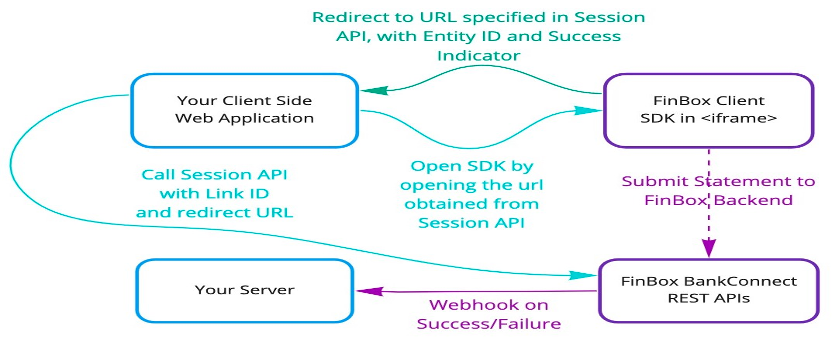
The flow for this involves following steps:
Create a session using Session API
Get the URL received from above API and open it in a new tab
On success / exit, Client SDK will redirect to the specified redirect URL with parameters as follows:
- Exit:
{url}?success=false - Success:
{url}?success=true&session_id=<some-session-id>
- Exit:
NOTE: Since there is no callback received on this flow, it is recommended to configure Webhook
# Inline Frame Workflow
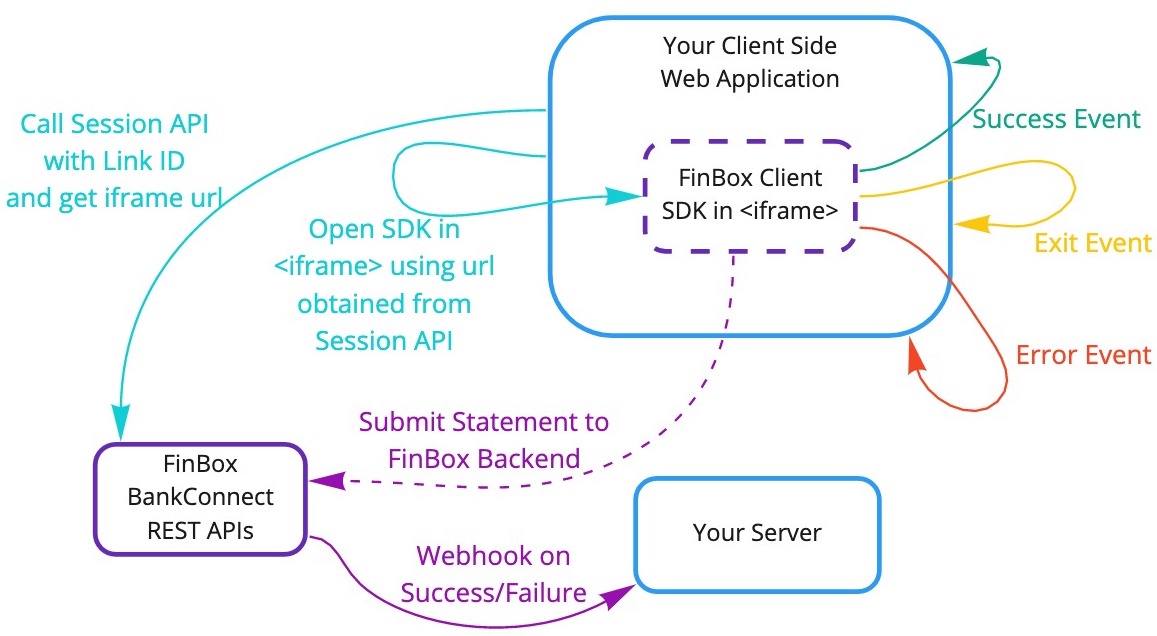
The flow for this involves the following steps:
- Create a session using Session API
- Get the URL received from above API and embed it in an
<iframe> - You'll receive callbacks by implementing an event listener. Based on the event you can close / hide the inline frame.
# Receive callbacks
- To receive callbacks in
<iframe>workflow, you need to implement an event listener. It can be implemented as follows:
<!DOCTYPE html>
<html lang="en">
<body>
  <script>
    window.addEventListener('message', function (event) {
      console.log("Event -> ", event)
    });
  </script>
  <iframe src="<url-from-create-session>" width="500px" height="700px"></iframe>
</body>Ï
</html>
- To receive callbacks in
Android WebView, a Javascript Interface (opens new window) can be used to get the events.
- Interface Name:
BankConnectAndroid - Callback Functions
- All Events:
onResult - Error:
onError - Exit:
onExit - Success:
onSuccess - Extra Info:
onInfo
- All Events:
# Event Object
The event object received by the listener can be one of the following:
# Success
This is received when user completes the upload process.
- Iframe
{
  type: "finbox-bankconnect",
  status: "success",
  payload: {
      "sessionId": "1d1f-sfdrf-17hf-asda", //Unique ID that will used to fetch statement data
      "linkId": "<USER_ID_PASSED>" //Link ID is the identifier that was passed while initializing the SDK
  }
}
- WebView
BankConnectAndroid.onSuccess
  {
      "sessionId": "1d1f-sfdrf-17hf-asda", //Unique ID that will used to fetch statement data
      "linkId": "<USER_ID_PASSED>" //Link ID is the identifier that was passed while initializing the SDK
  }
# Exit
This is received when user exits the SDK.
- Iframe
{
  type: "finbox-bankconnect",
  status: "exit",
  payload: {
      "linkId": "<USER_ID_PASSED>", //Link ID is the identifier that was passed while initializing the SDK
      "message": "<exit message>"
  }
}
- WebView
BankConnectAndroid.onExit
{
    "linkId": "<USER_ID_PASSED>", //Link ID is the identifier that was passed while initializing the SDK
    "message": "<exit message>"
}
# Error
This is received whenever any error occurs in the user flow.
- Iframe
{
  type: "finbox-bankconnect",
  status: "error",
  payload: {
      "reason": "Reason for failure",
      "linkId": "<USER_ID_PASSED>", //Link ID is the identifier that was passed while initializing the SDK
      "error_type": "MUXXX",//MUXXX for Manual Upload and NBXXX for Net Banking
  }
}
- WebView
BankConnectAndroid.onError
{
  "reason": "Reason for failure",
  "linkId": "<USER_ID_PASSED>", //Link ID is the identifier that was passed while initializing the SDK
  "error_type": "MUXXX",//MUXXX for Manual Upload and NBXXX for Net Banking
}
Two Events
In case an error occurs, you'll receive OnError event payload, and then if the user exits the SDK, you'll receive another event payload, this time for OnExit.
# Error types
In case of Error, error_type of MUXXX implies an error in Manual PDF Upload and NBXXX implies its from Netbanking.
| Case | error_type | Sample payload |
|---|---|---|
| Trial Expired for Dev Credentials | MU002 | {"reason:"Trial Expired for Dev Credentials",linkID:"<USER_ID_PASSED>","error_type":"MU002"} |
| PDF Password Incorrect | MU003 | {"reason:"Password Incorrect",linkID:"<USER_ID_PASSED>","error_type":"MU003"} |
| Specified bank doesn't match with detected bank | MU004 | {"reason:"Not axis statement",linkID:"<USER_ID_PASSED>","error_type":"MU004"} |
| Non Parsable PDF - PDF file is corrupted or has no selectable text (only scanned images) | MU006 | {"reason:"",linkID:"<USER_ID_PASSED>","error_type":"MU006"} |
| Not a valid statement or bank is not supported | MU020 | {"reason:"Not a valid statement or bank is not supported",linkID:"<USER_ID_PASSED>","error_type":"MU020"} |
| Invalid Date Range | MU021 | {"reason:"Please upload statements within the date range fromDate to toDate",linkID:"<USER_ID_PASSED>","error_type":"MU021"} |
| NetBanking Failed | NB000 | {"reason:"failure_message",linkID:"<USER_ID_PASSED>","error_type":"NB000"} |
| Netbanking Login Error | NB003 | {"reason:"failure_message",linkID:"<USER_ID_PASSED>","error_type":"NB003"} |
| Captcha Error | NB004 | {"reason:"Invalid Captcha",linkID:"<USER_ID_PASSED>","error_type":"NB004"} |
| Security Error | NB005 | {"reason:"failure_message",linkID:"<USER_ID_PASSED>","error_type":"NB005"} |
# Info Events
Android and JS events are passed which can used for purposes such as analytics.The object passed is of the following format.
- Iframe
{
  type: "finbox-bankconnect",
  status: "info",
  payload: {
      "linkId": "<USER_ID_PASSED>", //Link ID is the identifier that was passed while initializing the SDK
      "event_name": "bank_selected", // Name of the EVENT
      "message": "HDFC BANK",//extra data passed in certain events
  }
}
- WebView
BankConnectAndroid.onInfo
{
  "linkId": "<USER_ID_PASSED>", //Link ID is the identifier that was passed while initializing the SDK
  "event_name": "manual_upload_back", // Name of the EVENT
  "message": "",//extra data passed in certain events
}
| Event | event_name | message |
|---|---|---|
| Bank selected | bank_selected | <BANK NAME> |
| Manual upload screen opened | manual | - |
| Clicked back in Manual Upload | manual_upload_back | - |
| Clicked back in Netbanking | net_banking_back | - |